
Virtual fitting room for your online store
A virtual fitting room lets shoppers see a product on themselves before buying, right on your product page. With Prevyou, a shopper uploads one photo and sees your clothes, shoes, bags, eyewear, jewelry or watches on it in about 15 seconds, made from your existing product photos: no 3D model, no app for the shopper to download and no code for you.
 01The shopper’s photo
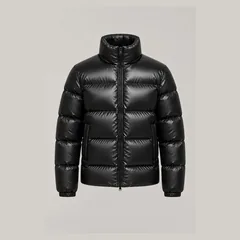 02Your product photo
 03The generated try-on
What is a virtual fitting room on an online store?
It is the online version of the fitting room: a button on the product page opens a window where the shopper sees the item on their own body, face or hand. It works in the browser, on phones and computers, so the shopper stays on your store.
The term covers several technologies. They differ in what they need from you and in the products they handle well.
What kinds of virtual fitting rooms exist?
| Type | How it works | What it needs from the store | Best for |
|---|---|---|---|
| AI photo try-on | The shopper uploads a photo; AI generates an image of them wearing the product | Your existing product photos | Clothing, full looks, shoes and bags; eyewear and jewelry with a close-up photo |
| Live AR (augmented reality) | The camera shows the shopper live with a 3D model drawn on top | One 3D model per product | Eyewear, jewelry and watches |
| 3D avatar | The shopper enters body measurements; a 3D figure wears a digital version of the garment | Detailed garment data (3D garments or measurements) | Checking size and fit |
How does Prevyou’s virtual fitting room work?
- A “Try it on me” button appears on your product pages, in your theme’s colors.
- The shopper accepts the photo terms, then takes or uploads a photo: head to toe for clothing, shoes and bags, face and shoulders for eyewear, necklaces and earrings, hand and wrist for rings, bracelets and watches.
- About 15 seconds later, they see the product on their own photo. Their face, pose, background and the rest of their outfit stay the same.
- With “Complete the look”, they add another piece to the same photo, such as a coat over a sweater, then add the whole look to the cart.
Which products can shoppers try on?
Tops, trousers, jeans, skirts, dresses, jumpsuits, jackets and coats; shoes and bags; eyewear, necklaces, earrings, rings, bracelets and watches. Items that are not worn, such as candles, books or gift cards, do not get the button.
How do you add a virtual fitting room to your store?
On Shopify, install Prevyou from the Shopify App Store and turn it on in the theme editor: no code, and nothing in your theme files changes. The button sits under “Add to cart” and follows your theme’s colors. A plugin for WooCommerce stores is on its way.
What happens to shopper photos?
The shopper agrees before sending a photo. Prevyou deletes the photo from its servers as soon as the result is ready and the result within 24 hours, never uses photos to train AI and collects no name, email or address.
How much does a virtual fitting room cost?
Prevyou includes 10 free try-ons a month, then you pay per try-on or choose a monthly plan. Failed try-ons are never billed, and you set a monthly spending cap. The AR apps in our comparison of Shopify apps are priced by number of products and need a 3D model of each item.
What a virtual fitting room does not do
- It does not recommend a size: the image shows the style and how the item looks on the shopper, not the exact fit.
- The result is an AI-generated image: it gives an idea of the look, it is not a photo of the real item.
- The result is better with a clear photo: standing, facing the camera, in good light. The window shows these tips before upload.
Frequently asked questions
Do shoppers need to download an app?
No. The virtual fitting room opens in the browser, on phones and computers, from your product page.
Do I need 3D models of my products?
Not with Prevyou: it works from the product photos already on your store. Live AR tools need one 3D model per product.
Does it replace my size guide?
No. It shows how the item looks on the shopper; your size guide still tells them which size to order.
Which stores can use it?
Shopify stores today, from the Shopify App Store. A WooCommerce plugin is on its way.
Related pages
How AI virtual try-on works for Shopify stores →
One shopper photo + your product photo = a try-on image in about 15 seconds. Which products work, what your store needs, the limits and the cost.
AI virtual try-on vs AR try-on: which one for your Shopify store? →
AI photo try-on and AR try-on (3D, live camera) compared for Shopify merchants: products covered, assets needed, setup, speed and cost.
Best virtual try-on apps for Shopify (2026) →
Seven virtual try-on apps for Shopify compared on 11 November 2026: price, products covered, installation, free plan or trial. Prevyou included.